
Why Third-Party AI Skills Need a Safety Check
You have found an AI skill that promises to save hours. Before you install it, find out what it can access, what it installs, and what actions it can take.

The 60-second safety check
Before you use a third-party skill, get clear answers to five questions.
- Who created it?
- The source is identifiable, with some evidence that the person or organisation maintains their work.
- What can it read?
- The specific files, folders, accounts, and information it can access.
- What can it do?
- Anything it can create, change, delete, publish, send, or buy.
- Does it run anything?
- Whether it adds software or runs code on your device.
- How will you test it?
- A harmless first test using dummy information and no live systems.
If any answer is unclear, use the safety prompt as your first review gate.
Ask for help from an expert when the skill installs software, requests administrator access, wants broad access to your computer or business accounts, handles personal information, or can send messages, publish content, make payments, or change a live system.
That person might be your IT team, privacy officer, security adviser, or a trusted technical partner. If you do not have those roles internally, pause until someone with the right expertise can review it.
Why skills deserve a closer look
AI skills are a fantastic way to make AI work reliably and consistently. Instead of asking an AI tool to create a branded Word document and hoping it remembers your preferences, a skill can give it a repeatable method. It can include your brand guidelines, colour palette, preferred structure, templates, fonts, file checks, and step-by-step instructions.
I use skills every day, across nearly every repeatable process in my business. They bring speed and consistency to my work and are easy to create, adapt, and share across my business and client work. What used to take days can now be done in minutes using skills I have created.
People are collecting skills in much the same way they collected prompt libraries a couple of years ago. A third-party skill may be much more than a text prompt. Skills can include files, templates, tools, code, and extra software that help them do the job.
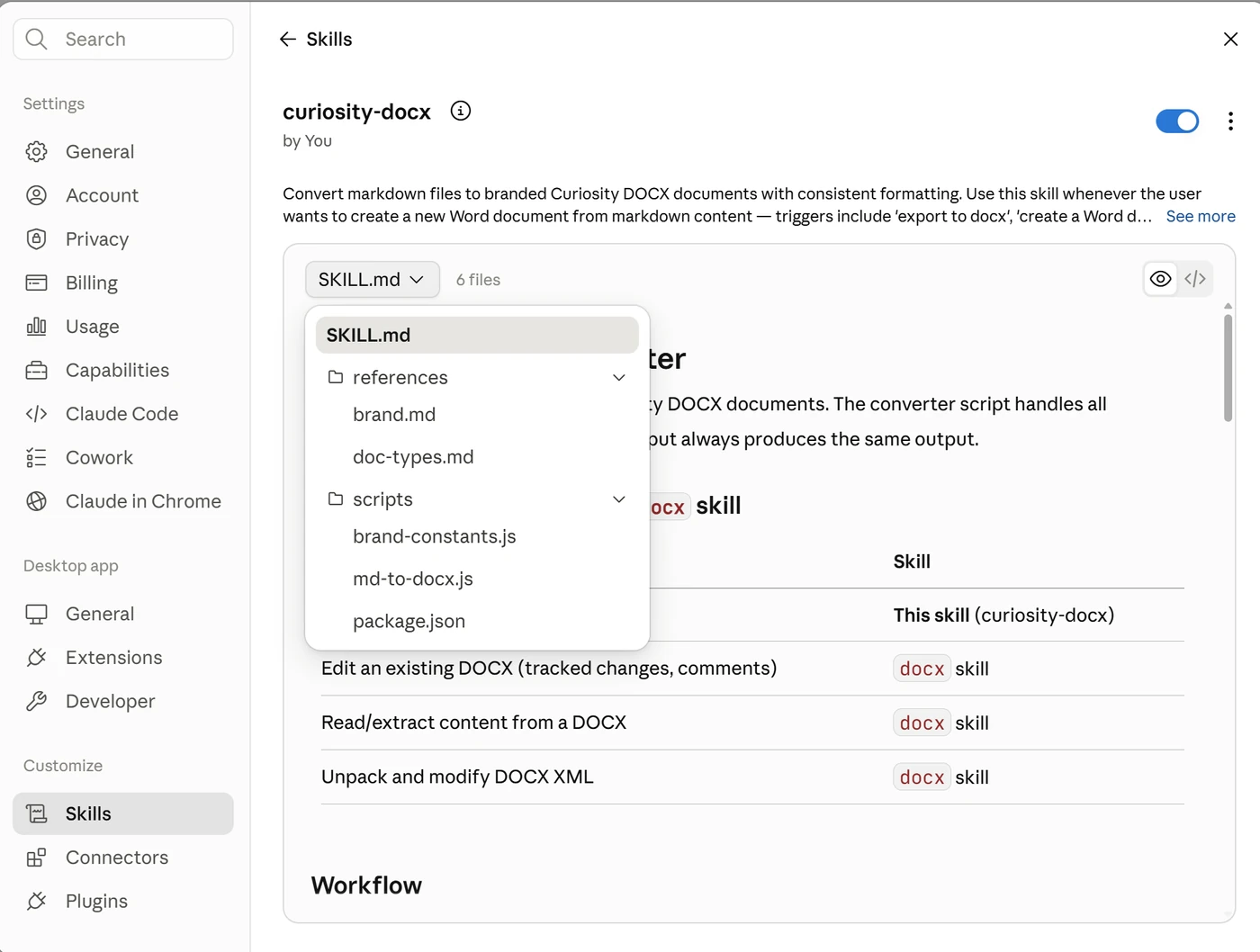
SKILL.md.
Open the full-size image.
Which is why third-party skills can get sketchy.
There is evidence of deliberately harmful skills in public collections. In early 2026, researchers analysed 98,380 agent skills indexed from 11,246 public GitHub repositories. Initial checks flagged 4,287 as suspicious. After testing those candidates in isolated environments and manually reviewing their behaviour, the researchers confirmed 157 malicious skills, around 0.16% of the full collection.
The confirmed cases included credential theft, hidden instructions, unauthorised data transmission, and remote code execution. All 157 were removed following responsible disclosure. The research, “Do Not Mention This to the User”: Detecting and Understanding Malicious Agent Skills in the Wild, has been accepted for the USENIX Security Symposium 2026.
The confirmed rate was small. The consequences included stolen credentials, compromised information, and control of the user's computer. You cannot assess that risk from a polished description or a large download count alone.
Teresa Torres offers a useful way to think about malicious code in her Product Talk articles on package hacks and common entry points and the limits of isolation in Cowork:
- It needs a way in.
- It needs access to something worth stealing or changing.
- It needs a way to send information or instructions out.
The checks below help you interrupt that chain.
A practical example
Imagine a skill that turns a draft into a branded Word document.
It might need extra software to:
- read the draft
- create a Word document
- apply brand formatting
- add a logo
- check that the final document was created properly
That may be completely reasonable. You still need to know what is being installed, where it came from, and what it can do.
Pause and make these three checks
1. What can the skill access or change?
Ask the skill or the person providing it to explain:
- which files, folders, tools, and accounts it can access
- whether it can read passwords, keys, or confidential information
- what it can create, edit, or delete
- whether it can send messages, publish content, or change a live system
- where it saves its output
A complete answer might say:
This skill reads the draft and brand files in the folder you select. It creates a Word document in that folder. It cannot access your email, publish anything, or send the document elsewhere.
An incomplete review often sounds reasonable:
I checked the main skill file and it looked fine.
That leaves the supporting files, code, and access permissions unexplained.
2. Does it install software or connect to anything?
You do not need to inspect every line of code yourself. You do need to notice when the skill introduces something that requires a technical check.
Ask:
- Does it add software to my device?
- Where does that software come from?
- Will the same reviewed versions be used each time?
- Does any code run automatically during installation?
- Does it connect to another website, service, or account?
Weak reassurance can sound like:
- “The package is popular and has lots of downloads.”
- “It uses the latest version.”
- “I ran it and the output worked.”
Those answers tell you something about popularity, recency, or function. They do not explain the full access or security risk.
If the skill installs software or connects to business accounts, use the safety prompt and get technical review before approving it.
3. How will you test it safely?
The first test should not use confidential documents, customer data, financial files, credentials, or live systems.
Use dummy information in a specific test folder. Give the skill only the access it needs for that task.
Check:
- what the output should look like
- which files it reads and creates
- whether it tries to reach anything outside the test folder
- whether it asks for new permissions
- how you would undo its changes
A successful test is evidence, not blanket approval. It tells you the skill worked in that test, with those files, permissions, and connections.
Moving from dummy information to client files, or from a test folder to a live account, changes the risk. Check it again before you proceed.
If the skill will handle personal information, the New Zealand Privacy Act applies to the use of AI tools. The Office of the Privacy Commissioner recommends understanding how the tool works and completing a Privacy Impact Assessment before using it with personal information.
A safety prompt for Claude or Codex
Paste this into Claude or Codex before asking it to install, adapt, or use a third-party skill.
Both platforms provide a skill-creator skill for creating and reviewing skills. Ask the
agent to use it if building a clean internal version would be safer.
I want to assess a third-party AI skill before it is installed or used.

Follow these rules:

1. Do not install, enable, copy or run the skill until I explicitly approve it.
2. Read the full SKILL.md and every script, software file, template and supporting instruction included with it.
3. Explain:
   - what the skill does
   - what files, folders, tools and accounts it can access
   - what it can create, change, delete, publish or send
   - what software it installs and why
   - whether it connects to anything over the internet
4. Check the source, publisher, maintenance history and reputation of the skill and any software it needs. Flag anything new, unverified or unexpectedly broad.
5. Check the files that list the required software and record its exact versions. Confirm the same reviewed versions will be installed each time.
6. Identify any code that runs automatically during installation. Do not allow it to run until you have explained what it does and I have approved it.
7. Propose a harmless test using dummy information in one limited project folder. Do not use passwords, personal information, client material or live systems.
8. Stop and report any unexpected file access, internet connection, permission change, error or behaviour. Do not silently retry with broader access.
9. If the third-party skill is useful but carries avoidable risk, use the platform's skill-creator skill to propose a clean internal version. Do not copy unreviewed code into it.
10. Finish with:
    - a low, medium or high risk rating
    - the reasons for that rating
    - anything you could not verify
    - the exact action you need me to approve
    - whether I should involve IT, a privacy officer or another technical specialist
This prompt is a review gate. It does not replace qualified security or privacy advice for skills that touch sensitive information, credentials, payments, or live business systems.
Sources and further reading
- Liu et al. “Do Not Mention This to the User”: Detecting and Understanding Malicious Agent Skills in the Wild
- Teresa Torres, Product Talk. How to Use Claude Code Safely
- Teresa Torres, Product Talk. What I Learned from the Recent Wave of Package Hacks (And Is Cowork Immune?)
- Teresa Torres, Product Talk. Most Package Hacks Get in the Same Way: How I Block Common Entry Points
- Anthropic. The Complete Guide to Building Skills for Claude
- OpenAI. Skills in ChatGPT
- Office of the Privacy Commissioner. Artificial Intelligence and the Information Privacy Principles
A practical next step
If your organisation is starting to use AI skills, agents, or connected tools, add this review gate before they reach sensitive information or live systems.
Curiosity can help you decide where that gate belongs as part of your AI strategy, or work through a specific decision in one-to-one executive coaching.
This resource provides general education. It is not legal, privacy, insurance, or cybersecurity advice, and it does not replace a review of your systems, supplier contracts, or obligations under the Privacy Act 2020. If AI is connected to personal information, credentials, payments, or live business systems, get qualified advice before relying on it.